# Setup
## Install the package
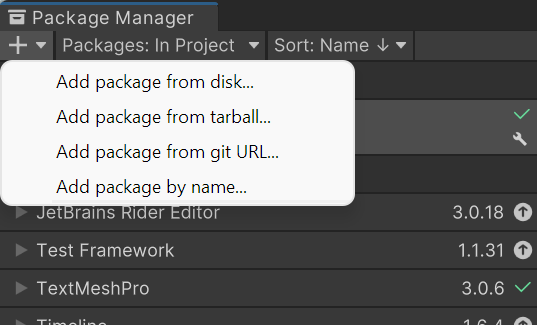
First and foremost you need to add the package to **Unity**. In Unity navigate to **Windows > Package Manager**. Then in the top left click the **"+"** symbol, and select **"Add package from git URL"**.
{% hint style="warning" %}
You will need [Git](https://git-scm.com/downloads) installed if not already.
{% endhint %}
Next, copy the following **URL** into the text box that appeared.
```url
https://github.com/maraudical/StatusEffectsFramework-Unity.git
```
## Import Samples (Optional)
If you haven't used the framework before, it is **highly recommended** to import the samples as they will give you a good idea of how to implement custom effects and create an effect UI. You can add them through the package manager in the samples tab of the Status Effect Framework package.
## Edit Settings (Optional)
It isn't required to edit the settings, however it may be useful to add your own groups to effects. You can find the settings at **Edit > Project Settings > Status Effect Settings**.
{% hint style="info" %}
**Good to know:** Make sure to check out [Status Effect Settings](https://maraudical.gitbook.io/status-effect-framework/1.7.0/settings) for more info.
{% endhint %}
## Creating Your First Status Effect
You can create your own custom [StatusEffectData](https://maraudical.gitbook.io/status-effect-framework/1.7.0/type-specifics/scriptable-objects/statuseffectdata) by right clicking the project file browser, and navigating to **Create > Status Effect Framework > Status Effect Data**. There are many settings you can tweak, but the main three you should change are the Comparable Name, Base Value, and the Effects list. Go ahead and add your first effect.
You will need to create your first [StatusName](https://maraudical.gitbook.io/status-effect-framework/1.7.0/type-specifics/scriptable-objects/statusname) and [ComparableName](https://maraudical.gitbook.io/status-effect-framework/1.7.0/type-specifics/scriptable-objects/comparablename). Navigate to **Create > Status Effect Framework > Status Name > Float** and **Create > Status Effect Framework > Comparable Name**. You can change the [StatusName](https://maraudical.gitbook.io/status-effect-framework/1.7.0/type-specifics/scriptable-objects/statusname) to be whatever you want, just know that it will only affect a [StatusVariable ](https://maraudical.gitbook.io/status-effect-framework/1.7.0/type-specifics/classes/statusvariable)with the same [StatusName](https://maraudical.gitbook.io/status-effect-framework/1.7.0/type-specifics/scriptable-objects/statusname).
Once they are created, add them into the [StatusEffectData](https://maraudical.gitbook.io/status-effect-framework/1.7.0/type-specifics/scriptable-objects/statuseffectdata). Additionally you can tweak the [value modifier](https://maraudical.gitbook.io/status-effect-framework/1.7.0/type-specifics/scriptable-objects/statuseffectdata/effect#value-modifier) depending on what the effect is.
{% hint style="info" %}
**Good to know:** Make sure to check out [Value Modifier](https://maraudical.gitbook.io/status-effect-framework/1.7.0/type-specifics/scriptable-objects/statuseffectdata/effect#value-modifier) for more info.
{% endhint %}
It is important to use the base value for something, it doesn't need to be in an [Effect](https://maraudical.gitbook.io/status-effect-framework/1.7.0/type-specifics/scriptable-objects/statuseffectdata/effect) (it could be used in a [Module](https://maraudical.gitbook.io/status-effect-framework/1.7.0/type-specifics/scriptable-objects/module)) but it should be used somewhere. The value is used to calculate [non-stacking behavior](https://maraudical.gitbook.io/status-effect-framework/1.7.0/type-specifics/scriptable-objects/statuseffectdata#non-stacking-behaviour) so to make our first effect use the base value you can select the checkbox next to Float Value.
## How to Add Status Effects To Your Classes
Obviously you don't want to completely rewrite your current entities or characters or whatever they may be just to implement simple status effects. All you need to do is replace all variables that need to be effected by status effects with a [StatusVariable](https://maraudical.gitbook.io/status-effect-framework/1.7.0/type-specifics/classes/statusvariable)! Next just add in the [StatusManager](https://maraudical.gitbook.io/status-effect-framework/1.7.0/type-specifics/classes/statusmanager) on the GameObject. In the Start() or Awake() method you can link the [StatusVariables](https://maraudical.gitbook.io/status-effect-framework/1.7.0/type-specifics/classes/statusvariable) to that [StatusManager](https://maraudical.gitbook.io/status-effect-framework/1.7.0/type-specifics/classes/statusmanager) and it's ready to use status effects!
Here is an example where in your class you can add any [StatusVariables](https://maraudical.gitbook.io/status-effect-framework/1.7.0/type-specifics/classes/statusvariable) that need to be effected by [StatusEffects](https://maraudical.gitbook.io/status-effect-framework/1.7.0/type-specifics/classes/statuseffect), add in their [StatusNames](https://maraudical.gitbook.io/status-effect-framework/1.7.0/type-specifics/scriptable-objects/statusname) (Create>Status Effect Framework>Status Name) and you're good to go! You can tweak the base value to your liking too.
```csharp
// Dont forget to use the StatusEffect namespace!
// Example variables
public StatusFloat maxHealth;
public StatusInt coinMultiplier;
public StatusBool stunned;
private void Start()
{
//Add this to your Start() or Awake() method
// Obtain the StatusManager, this doesn't need to be on the
// same GameObject but you need to get the reference for whatever
// you want to store this class's status effects.
StatusManager statusManager = GetComponent();
maxHealth.SetManager(statusManager);
coinMultiplier.SetManager(statusManager);
stunned.SetManager(statusManager);
}
```
All you need to do to add or remove [StatusEffects](https://maraudical.gitbook.io/status-effect-framework/1.7.0/type-specifics/classes/statuseffect) is call the add and remove methods from the [StatusManager](https://maraudical.gitbook.io/status-effect-framework/1.7.0/type-specifics/classes/statusmanager). That's it!
## Important Information/Links
Again it is recommended to check out the [samples](https://github.com/maraudical/StatusEffectsFramework-Unity/tree/main/Samples~), as they show a rough idea of how to get started. If you want more customized effects you may also want to check out [Modules](https://maraudical.gitbook.io/status-effect-framework/1.7.0/type-specifics/scriptable-objects/module).
If you encounter any [issues](https://github.com/maraudical/StatusEffectsFramework-Unity/issues) or would like to make a [pull request](https://github.com/maraudical/StatusEffectsFramework-Unity/pulls) feel free to do so I am open to feedback!
You can also reach out to me on [Discord](https://discordapp.com/users/285622166026977282) if you have any questions.
---
# Agent Instructions: Querying This Documentation
If you need additional information that is not directly available in this page, you can query the documentation dynamically by asking a question.
Perform an HTTP GET request on the current page URL with the `ask` query parameter:
```
GET https://maraudical.gitbook.io/status-effect-framework/1.7.0/setup.md?ask=
```
The question should be specific, self-contained, and written in natural language.
The response will contain a direct answer to the question and relevant excerpts and sources from the documentation.
Use this mechanism when the answer is not explicitly present in the current page, you need clarification or additional context, or you want to retrieve related documentation sections.